ENISA Single Reporting Platform (SRP) · CRA Single Reporting Platform
The ENISA Single Reporting Platform (SRP) is the CRA single reporting platform under Article 16. The platform has been operational since 11 September 2026 for mandatory reporting of actively exploited vulnerabilities and severe incidents impacting product security.
Due within 24h of awareness of actively exploited vulnerability or severe incident.
Due within 72h of awareness with technical assessment and initial mitigations.
14 days post-fix for vulnerabilities; 1 month post-72h for severe incidents.
No manufacturer API available. Tooling prepares dossiers; an authorised person submits.
Quick answers
Who reports
Manufacturers of products with digital elements made available on the EU market must report mandatory events. Open-source software stewards report when involved with a product with digital elements. The voluntary channel accepts submissions from security researchers, integrators, customers, and any natural or legal person.
What triggers reporting
Mandatory obligations trigger on two events: an actively exploited vulnerability in a product with digital elements (Article 14(1)), or a severe incident affecting product security (Article 14(3)). Voluntary reporting covers non-exploited vulnerabilities, general threats, and near misses (Article 15).
Where the filing goes
One single filing reaches your coordinating national CSIRT and ENISA at the same time. The coordinating CSIRT is the designated team in the EU Member State where your main establishment is located.
When duties start
11 September 2026. The platform becomes operational on this date, matching the application date of CRA Article 14 manufacturer reporting obligations.
Assigned Representative roles & account rules
The SRP operates on a structured hierarchy of roles. Access permissions, invitation rights, and notification responsibilities depend on your role.
Manufacturer
The legal entity that places a product with digital elements on the EU market. The manufacturer retains statutory legal responsibility for compliance. The manufacturer can designate an authorised external representative.
Primary Authorised Representative
The first representative registered for a manufacturer in the SRP. Registration requires CSIRT approval of the association between representative and manufacturer. The Primary AR can invite backup representatives when filing is needed.
Secondary AR / AR Backup User
Invited by email by the Primary AR. The SRP assigns this user the AR Backup User role. The invitation expires after seven days. The backup representative provides operational continuity during out-of-hours events and personnel leave.
Designated CSIRT
The national Computer Security Incident Response Team of the EU Member State of main establishment. Validates representative associations, receives filings, and disseminates notifications to CSIRTs in other affected Member States.
Operational account & identity rules
- •Users can create individual EU Login accounts in advance at the European Commission authentication service.
- •ENISA currently advises manufacturers to start SRP registration and CSIRT validation only when they need to submit a notification.
- •CSIRT validation occurs in parallel and does not block initial notification submission.
- •The first submitted AR registration claims Primary AR status subject to CSIRT verification, so the manufacturer must standardise its legal name and internal owner before the first filing.
- •The Primary AR can invite a Secondary AR. The SRP assigns the invited person the AR Backup User role.
- •The invitation to a Secondary AR expires after seven days.
- •If the Primary AR becomes unavailable before a backup is assigned, adding a backup can require additional CSIRT coordination.
- •One AR account can represent multiple manufacturers and can hold different roles for each manufacturer.
- •A manufacturer can designate an authorised external representative established within the Union.
- •Use individual EU Login accounts. Do not use shared EU Login credentials. A functional mailbox can support internal alerts and handover records, but it must not replace individual SRP identities unless current EU Login and SRP terms expressly permit it.
- •Standardise the exact legal manufacturer name and address before registration because manufacturer data is entered as free text in the SRP.
- •Draft notifications are visible only to the AR who created them. Additional Notes can also remain creator-specific. Assign one internal owner to each draft.
Registration guide
Step-by-step workflow for setting up EU Login credentials, entering representative details, associating legal manufacturers, and obtaining CSIRT validation.
Create Individual EU Login Account
Establish individual identity before accessing the SRP.
Each user must create an individual EU Login account with the European Commission authentication service (ECAS). Use individual company email addresses. Do not use shared account credentials.
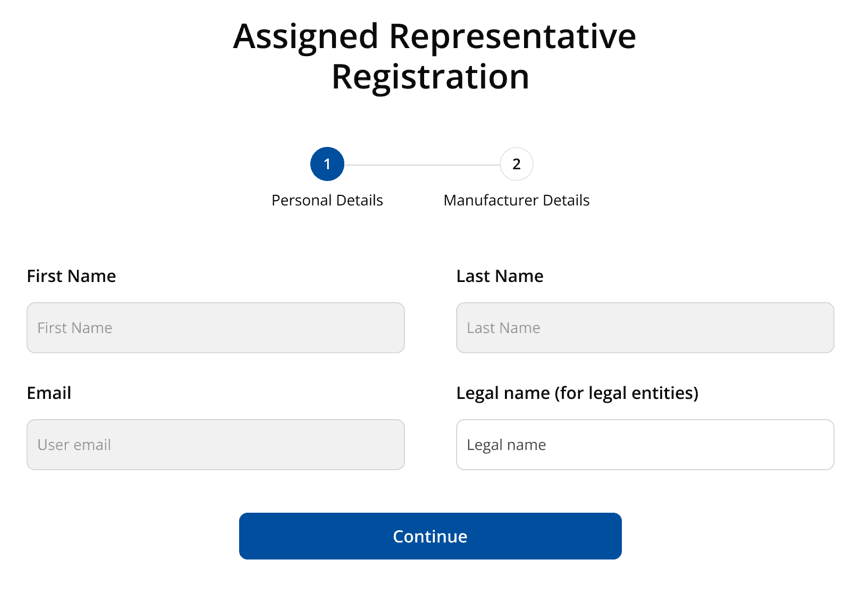
Enter Personal Details
Complete representative profile fields.
Sign in to the SRP and enter personal contact details, including full name, business email, and telephone number. This information attaches to your representative identity across all filings.
Select Representative Role
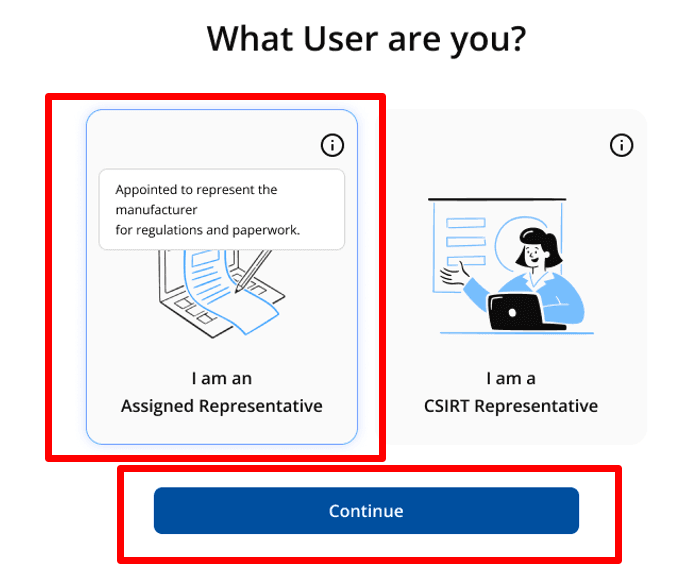
Choose representative classification in the platform.
Select your role in the SRP interface. In accordance with ENISA registration guidance, the interface distinguishes an Assigned Representative (Authorised Representative) from a CSIRT Representative.
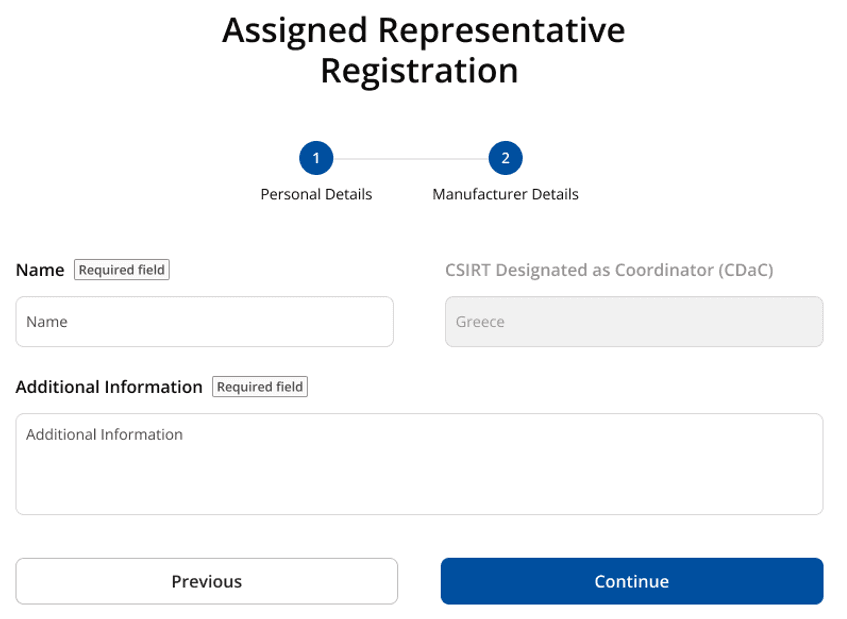
Enter Legal Manufacturer Details
Input standardised manufacturer name and address.
Enter the exact legal entity name, country of establishment, and registered business address. Standardise this data against your EU Declaration of Conformity and technical file.
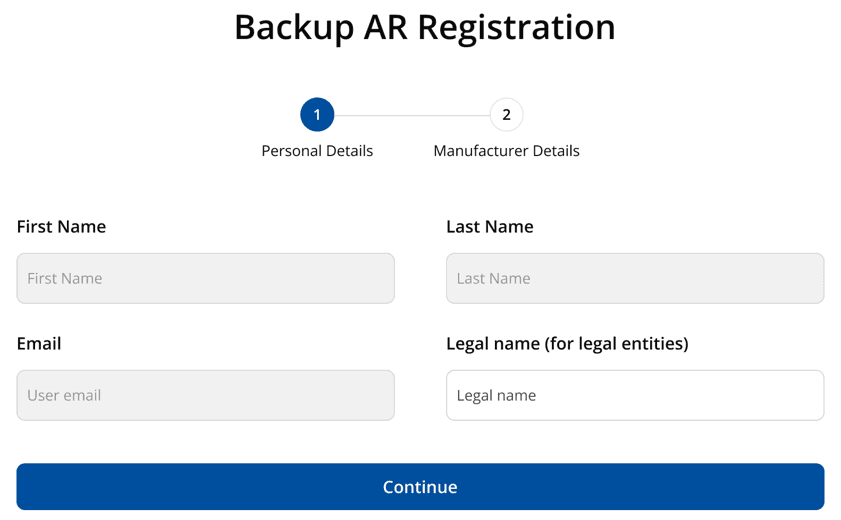
Secondary AR Registration View
Accept pending representative role assignment.
When a Secondary AR accepts an email invitation, the platform presents their association docket. The Secondary AR receives the AR Backup User role for that manufacturer.
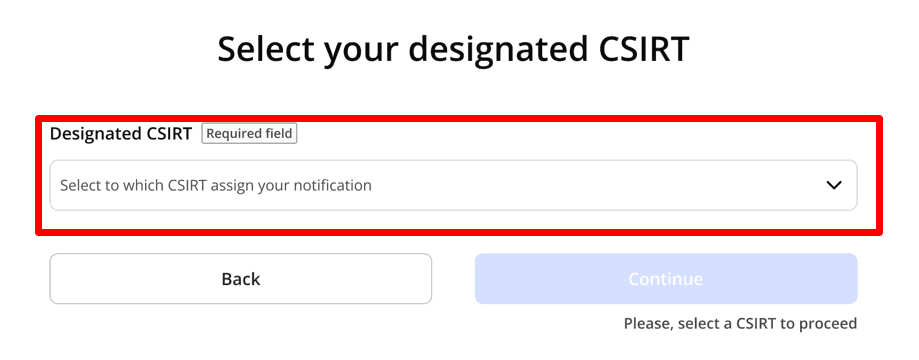
CSIRT Association Validation
Designated CSIRT validates association in parallel.
The designated coordinating CSIRT reviews and approves the AR-to-manufacturer link. Validation runs asynchronously in parallel and does not delay submission of early warnings.
Role & association management
Procedures for inviting backup representatives, managing multiple manufacturer mandates, claiming unassigned primary roles, and removing stale associations.
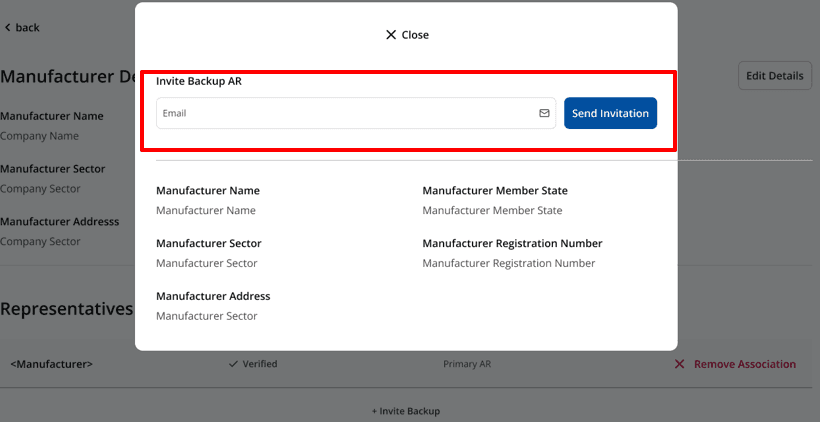
Invite a Secondary AR (Backup User)
The Primary AR sends an invitation email to a colleague when secondary access is needed. The invitation is valid for seven days. The invited user gains the AR Backup User role to submit and manage reports if the Primary AR is unavailable.
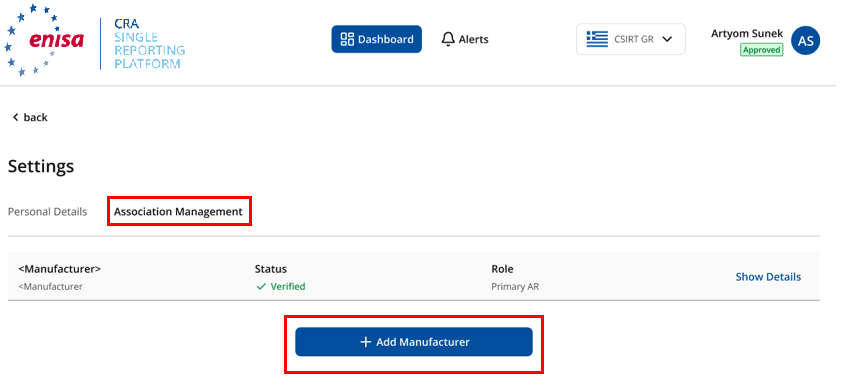
Add Another Manufacturer to Account
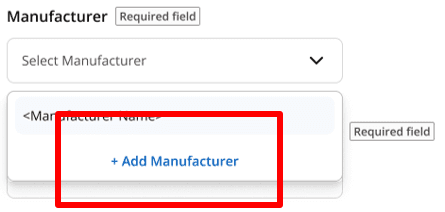
A single Authorised Representative account can represent multiple manufacturers. Use the Add Manufacturer workflow to attach another legal entity to your portfolio. Each new link receives separate CSIRT validation.
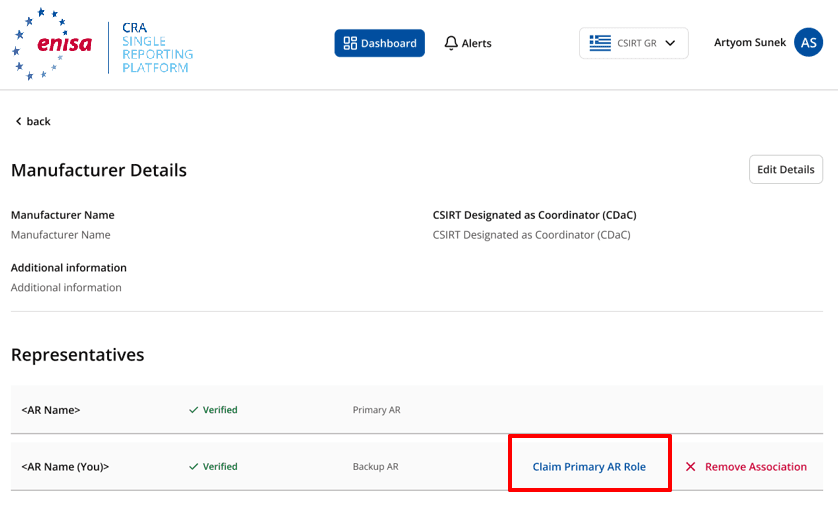
Claim Primary AR Role
If a manufacturer profile in the SRP has no active Primary AR, a verified representative can initiate a claim for the Primary AR role subject to designated CSIRT review and approval.
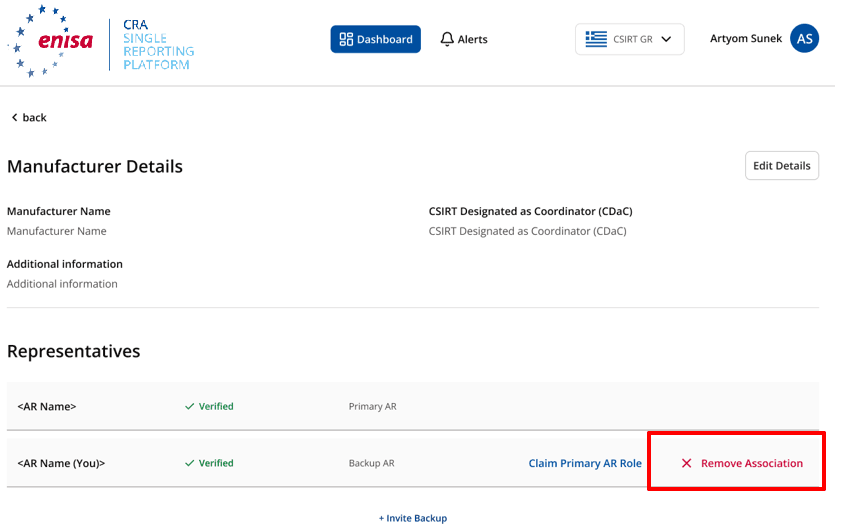
Remove Manufacturer Association
Representatives can remove their association with a manufacturer when a mandate ends. Revoking an association preserves historical submission dossiers and audit records on the platform.
Notification stages & submission guide
Lifecycle of CRA Article 14 filings from case initiation and 24-hour early warnings through 72-hour technical notifications and final closure reports.
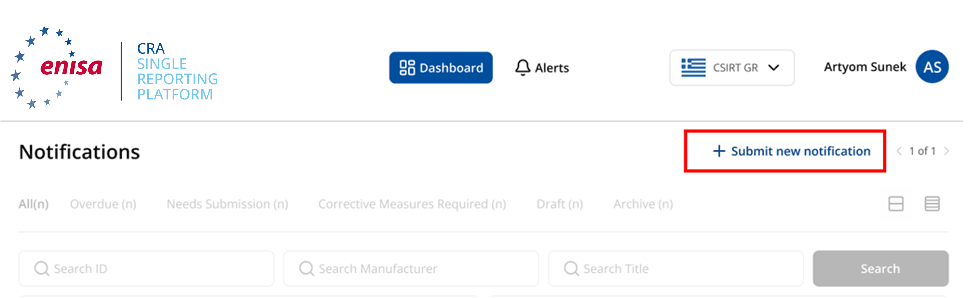
Select Manufacturer and Start Notification
Select the manufacturer profile and choose the notification category: actively exploited vulnerability (Article 14(1)) or severe incident (Article 14(3)). The platform generates a unique dossier reference.
Validation Lifecycle and Parallel Submission
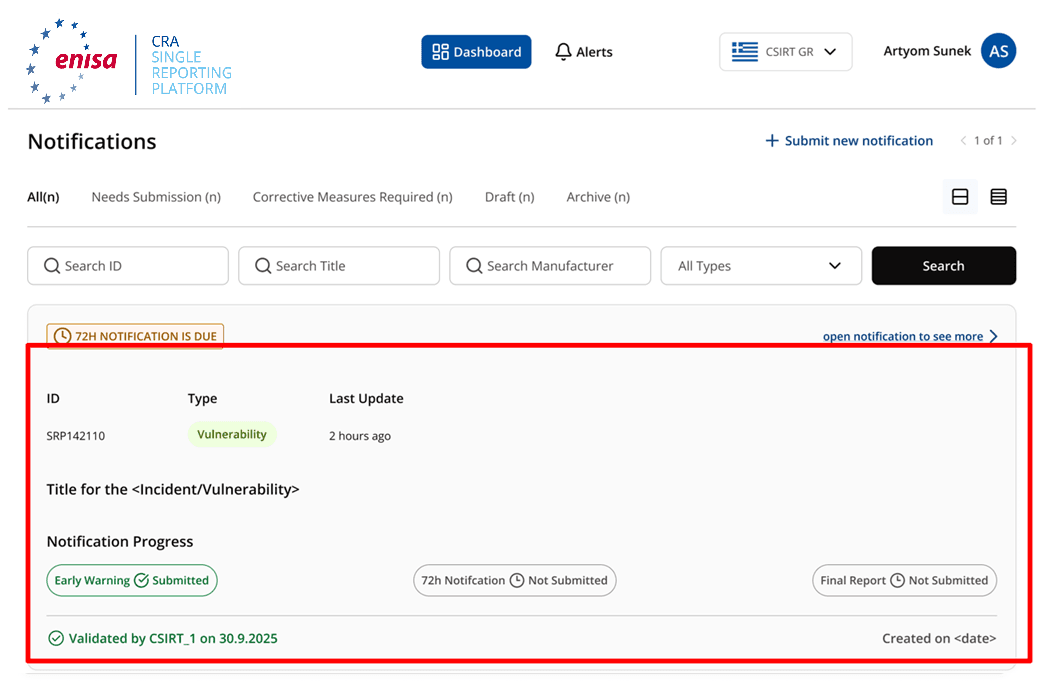
Filing is never blocked by pending CSIRT association checks. The SRP interface records the state before and after CSIRT review, allowing immediate submission of urgent early warnings.
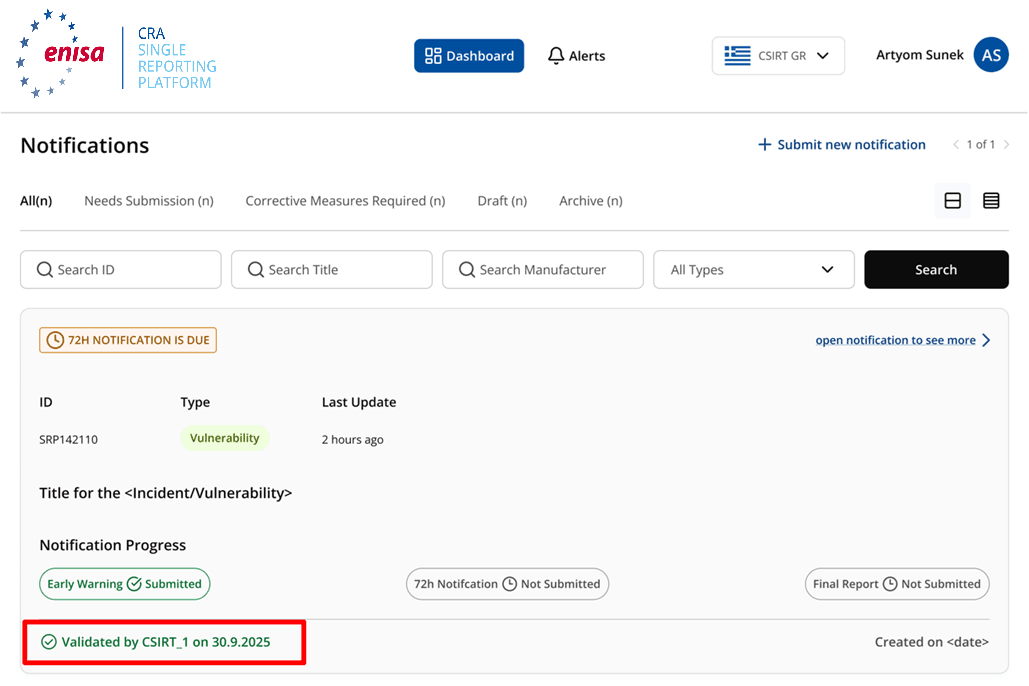
24-Hour Early Warning Submission
Due within 24 hours of awareness. Obligatory fields at this stage are minimal: notification type, severity level, manufacturer name, product name, incident title, and affected Member States. Product category and Annex classification remain optional.
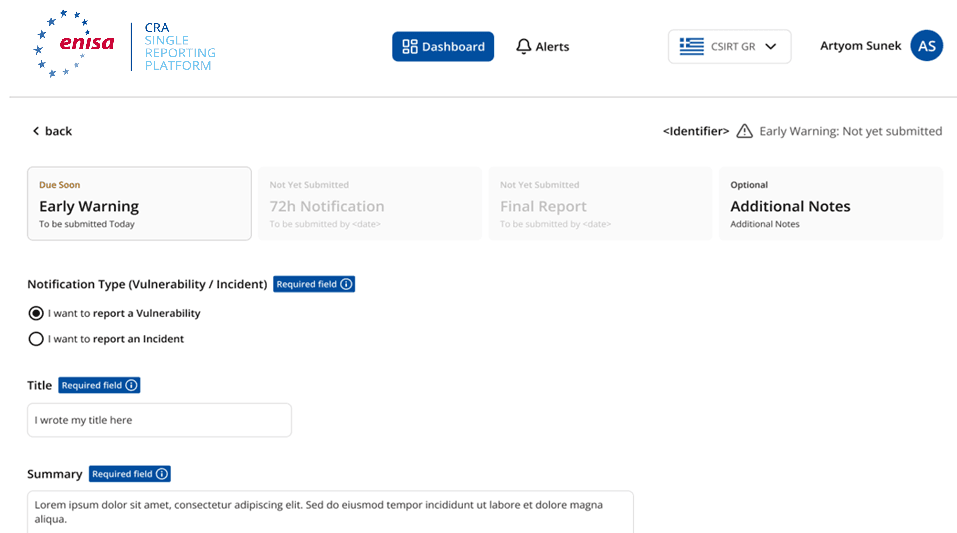
Internal Draft Handling and Additional Notes
Draft notifications and Additional Notes are visible only to the AR user who created them. Always designate one internal owner per filing to maintain continuity across shifts.
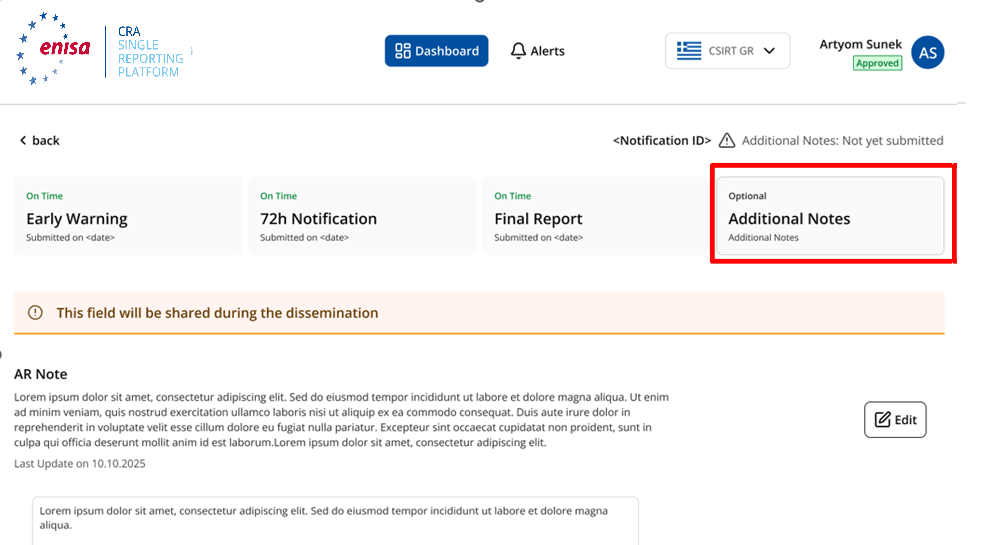
72-Hour Detailed Notification
Due within 72 hours of awareness. For a vulnerability: nature of vulnerability, active exploitation indicators, corrective measures, and user mitigation steps. For an incident: incident nature, time of detection, and initial security impact assessment.
Final Report Submission
Closes the statutory dossier. Contains complete root-cause assessment, permanent corrective measures, supply chain impact, and final user advisory guidance.
Reporting deadlines & final-report rules
CRA Article 14 establishes separate statutory rules for actively exploited vulnerabilities and severe incidents. The final report clocks run from different trigger events.
For actively exploited vulnerabilities, the final report deadline does not count down from discovery. The 14-day clock starts only once a corrective or mitigating measure has been made available to users.
For severe incidents, the final report is due within one calendar month following the 72-hour notification. Per Regulation (EEC, Euratom) No 1182/71 Article 3(2)(c), this expires on the same calendar day of the following month.
| Stage | Statutory Deadline | Trigger Event | Legal Basis | Content Summary |
|---|---|---|---|---|
| Early Warning | 24 hours | From awareness of active exploitation or severe incident | Article 14(2)(a) & Article 14(4)(a) | Minimal flag to alert authorities. State whether event is suspected to result from malicious act. |
| Detailed Notification | 72 hours | From awareness of active exploitation or severe incident | Article 14(2)(b) & Article 14(4)(b) | Detailed technical assessment, severity indicators, and initial remediation steps. |
| Final Report — Vulnerability | No later than 14 days | After a corrective or mitigating measure is made available | Article 14(2)(c) | Clock starts only when a fix, patch, or mitigation is available. Requires full vulnerability description. |
| Final Report — Severe Incident | Within 1 month | After the 72-hour detailed notification | Article 14(4)(c) | Calculated per Regulation 1182/71 Article 3(2)(c) as the same calendar day of following month. |
Field Requirement Markers
The SRP marks fields as REQUIRED (blocks submission if empty) or If available (optional at 24h, required by 72h). Early warnings require only basic identification; technical dossiers expand at 72 hours.
Restricted Dissemination (Article 16(2))
Under CRA Article 16(2), where justified on cybersecurity grounds, the receiving CSIRT may decide to delay dissemination of a notification to avoid compromising unpatched devices or immediate user security.
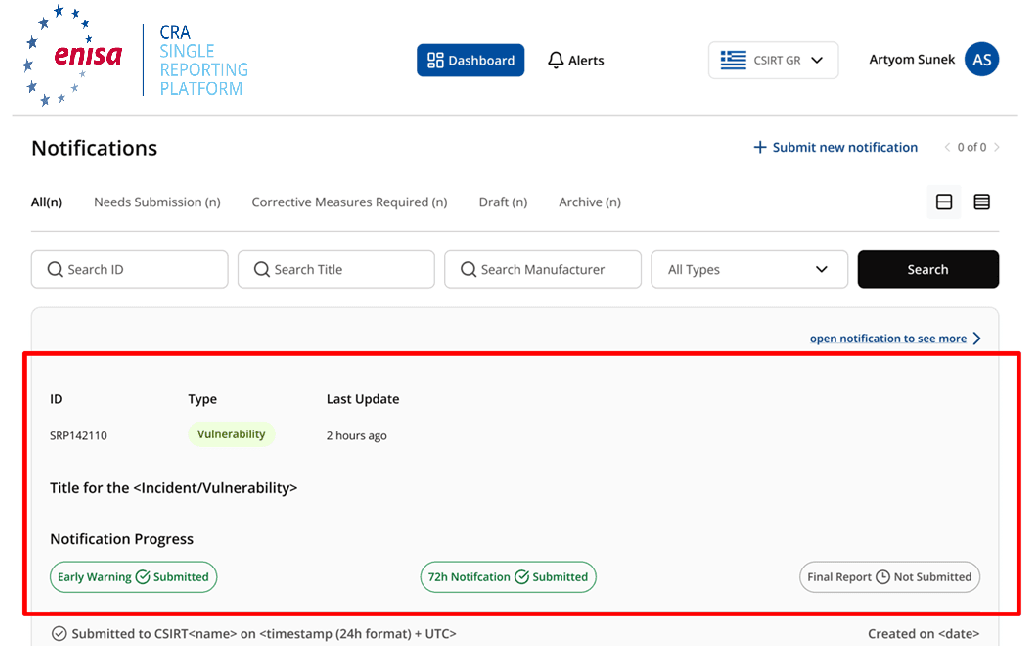
Notification states in the SRP interface
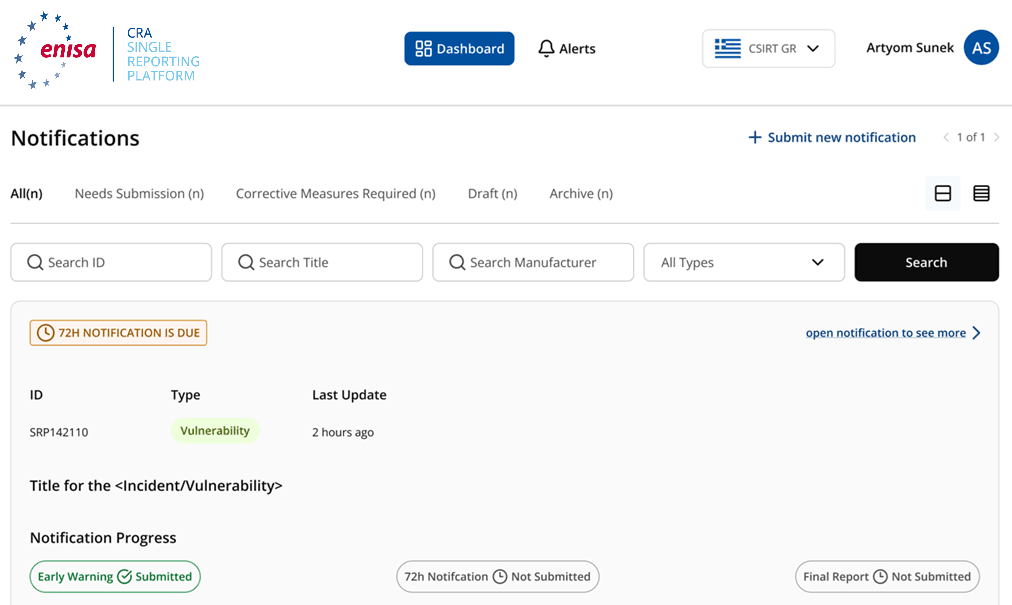
These are the notification states shown in the August 2026 ENISA interface guide as a filing progresses through the reporting workflow.
The notification record is created in the SRP but not yet submitted. Draft notifications and associated Additional Notes are visible only to the representative who created them.
The 24-hour early warning has been submitted to the platform, notifying the coordinating CSIRT and ENISA simultaneously.
The 72-hour detailed notification has been submitted with technical assessments, impact evaluations, and initial corrective or mitigating measures.
The 72-hour detailed notification has been submitted under Particularly Exceptional Circumstances (PEC) pursuant to CRA Article 16(2), where delayed or restricted onward dissemination is requested on cybersecurity grounds.
The final report has been submitted (showing the Final Report sub-state), providing root-cause analysis, permanent remediations, or closure details.
Operational readiness checklist
Resolve these points before a report is due. The 24-hour statutory clock runs from awareness.
- 01.Set up individual EU Login accounts for all compliance and security incident responders in advance.
- 02.Identify a designated Primary Authorised Representative and a named backup representative.
- 03.Standardise exact legal manufacturer name, address, and VAT/registration number across technical records.
- 04.Identify the EU Member State of main establishment and verify the designated national coordinating CSIRT.
- 05.Maintain an updated list of all EU Member States where each digital product is made available on the market.
- 06.Pre-classify all digital products against CRA Annex III and IV categories in your compliance registry.
- 07.Establish 24/7 on-call coverage for manual SRP submissions because ENISA provides no manufacturer submission API.
- 08.Assign a single internal owner to each notification draft to prevent visibility gaps during handovers.
- 09.Configure statutory countdown trackers for the 24h, 72h, 14-day (post-fix), and 1-month (post-72h) deadlines.
- 10.Document internal criteria for requesting restricted dissemination under CRA Article 16(2).
Official ENISA sources & platform limits
Verify procedures against official European Union publications and understand the operational boundaries of the SRP.
The operational SRP where authorised representatives sign in with EU Login and file Article 14 notifications.
Main ENISA hub for CRA Single Reporting Platform architecture and requirements.
Step-by-step guidance on creating EU Login access and AR role establishment.
Documentation on managing roles, invitations, and manufacturer associations.
Procedures for early warnings, 72h notifications, updates, and final reports.
Official answers on platform scope, roles, timelines, and CSIRT coordination.
Four things the SRP does not do
The Single Reporting Platform is one official authority channel. CVD Portal supports the operational and technical work before and around manual filing.
No manufacturer submission API
ENISA currently provides no direct API for manufacturer submissions. Every report requires an authorised person to log in through EU Login and complete the platform forms manually.
CVD Portal builds the SRP-ready dossier, checks required fields, tracks statutory deadlines, and records filing evidence. A person still submits through the SRP.
SRP does not evaluate legal reporting triggers
The platform does not determine whether an event meets the threshold of active exploitation or severe incident. The manufacturer must make that assessment internally before filing.
Triage and remediation is partly automated. CVD Portal drives CVSS scoring, severity workflow, assignment, status transitions, remediation tracking, and reporter correspondence through the system. Engineering and legal judgement remain with the manufacturer.
Enterprise AI option: Opt-in AI triage suggests severity, vulnerability type, CVSS 3.1 vector and score, a plain-language summary, possible duplicates, and Article 14 risk with a rationale. Staff review and apply all suggestions manually. AI does not change human decision fields or start an Article 14 clock.
SRP does not satisfy CRA Article 13 obligations
The SRP is purely an authority reporting channel. It does not replace the requirement for a public Single Point of Contact, vulnerability disclosure policy (security.txt), or CVD intake portal.
CVD Portal provides a free branded vulnerability disclosure portal, a published CVD policy, secure researcher intake, and an RFC 9116 security.txt endpoint.
SRP does not report under NIS2, DORA, or GDPR
A major cybersecurity incident can trigger obligations under CRA, NIS2, DORA, and GDPR simultaneously on differing clocks. The SRP satisfies the CRA leg only.
CVD Portal keeps the CRA report package, timestamps, and audit evidence together. It does not submit parallel NIS2, DORA, or GDPR notifications.
Frequently asked questions
What is the Single Reporting Platform (SRP) under the CRA?
Do I need to register on the SRP before I have something to report?
Who is required to report through the SRP?
Does the ENISA SRP offer an automated submission API for manufacturers?
Do I report to ENISA or to my national CSIRT?
What is the difference between Primary AR and Secondary AR?
Can one representative account represent multiple manufacturers?
How are the final report deadlines calculated for vulnerabilities versus incidents?
Are draft notifications in the SRP visible to other team members?
Arrive at the SRP with fields already validated
CVD Portal receives intake via your branded disclosure portal, starts the statutory Article 14 clocks upon confirmed exploitation, enforces required field completion, and generates a standardised dossier ready for manual entry.
CVD Portal supports CRA compliance work but does not provide legal advice and does not by itself establish conformity or a presumption of conformity. It is an independent platform, not affiliated with or endorsed by the EU or ENISA.